
Do you know the BIGGEST, MOST EXPENSIVE mistakes business owners make when moving their office?
Find out at www.brainlink.com/officemoves/
Do you know the BIGGEST, MOST EXPENSIVE mistakes business owners make when moving their office?
Find out at www.brainlink.com/officemoves/

Make all your computer problems go away without the cost of a full-time I.T. staff
At a recent Security Summit experts re-emphasized: hackers and cyber criminals are now turning their efforts to small “mom and pop” businesses instead of large enterprise corporations. Why? Because small business networks offer a much easier “lock” to pick, unlike large enterprises who invest far more man power and money into high security for their network.
“As the security becomes better at large companies, the small business begins to look more and more enticing to computer criminals,” said Charles Matthews, President of the International Council for Small Business, “It’s the path of least resistance.”
Think your network is secure? Take a look at these surprising statistics:
Why is security so poor for small business? Primarily for two reasons:
Ignorance. Most small businesses believe that nothing could ever happen to them, and therefore don’t take the necessary precautions to secure their network, monitor their systems, and train their staff.
They are also ignorant on HOW to get this done (which makes a strong argument for getting all of our clients on our BrainGUARD Plan! The second reason is that they are being cheap in the wrong places. Some simply refuse to spend money on securing their network. That’s akin to having a beautiful home full of expensive furnishings and valuables, but refusing to buy a good lock for the door because it “costs too much.”
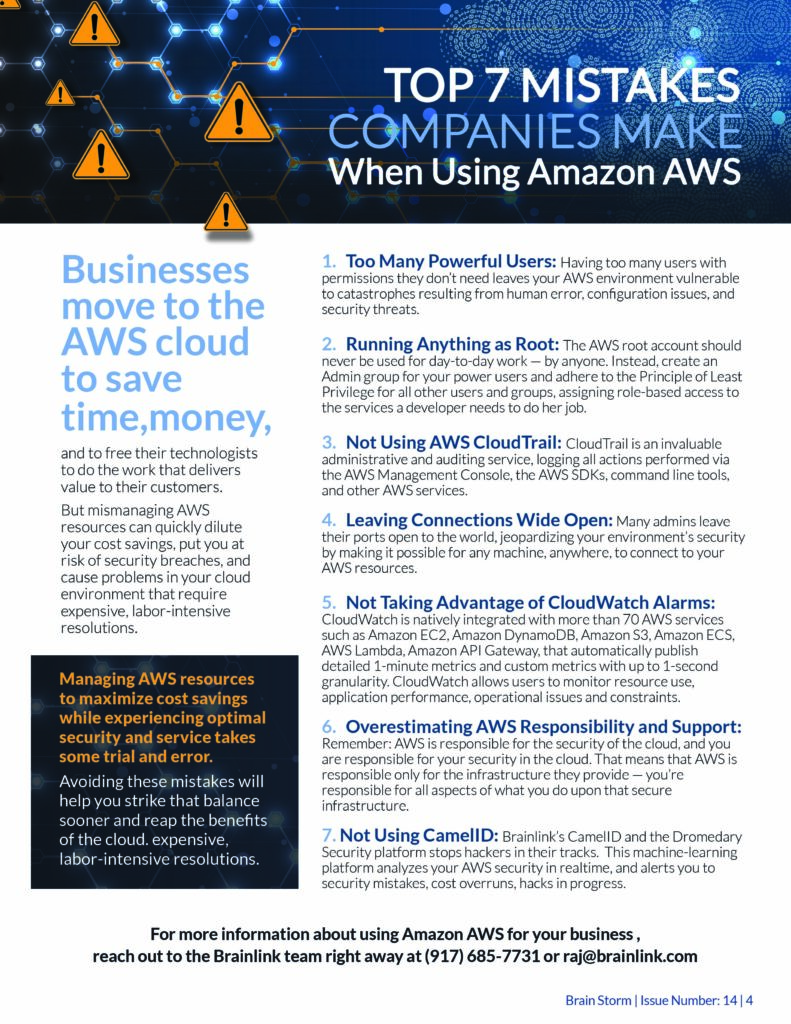
So what should you do at a minimum to protect your company? Here are 7 fundamentals:
For those of you on our BrainGUARD Plan, you can rest assured we are taking good care of issues 3 through 7; however, if you would like us to conduct a training class and develop an AUP (acceptable use policy) for your staff and then install a content filtering software to help enforce the policies, give us a call.
This training and software is a small price to pay for the peace of mind you’ll have over your network’s security. And since better than 80% of all security breaches happen because of an end-user mistake, you’ll also be taking a big step towards protecting your assets.
Our referral contest is back and we have a great prize for you:
Here’s how the contest works:
We will call and schedule an appointment.
When we get the appointment we will send you $25.00.
If your friend becomes a client, we will send you a check for $50.00. We will also give your friend a $100 discount off our services.
If you make more referrals than anyone else, you win a new iPad.
Contest starts: Ends April 15, 2013
Every month, I choose one very special “Client of the Month” as my way of acknowledging clients and thanking those who support me and my business with referrals and repeat business.
Meet Tom, Chris, Michael Gallin and Mark Varian ‐ family members and 4th generation owners of John Gallin & Son. For over 125 years, JGS has been providing quality, cost‐effective construction management and general contracting services for commercial interiors for the New York corporate community. Whether you do business with Ann Taylor, Wells Fargo, HQ Global Places or Frederic Fekkei, chances are, you’re standing in Gallin’s handiwork.
The best part about working with Gallin is that on every project, they promise “there’s always a member of the family on the job”.
“Brainlink’s staff is very responsive and professional”
‐ Tom Gallin, Partner
The evolution of personal mobile devices and the rise of how necessary they are to business success these days are forcing many small business owners to make a choice. BYOD or COPE? Or “Bring Your Own Device” vs. “Corporate Owned, Personally Enabled”.
The Typical Solution ‐ BYOD. According to the CDW 2012 Small Business Mobility Report, 89% of small‐business employees use their personal mobile devices for work. But the headache involved here is how do you support and secure all of these devices? The scary thing is that most small businesses don’t even try! The CDW survey found that only 1 in 5 small businesses have deployed (or plan to deploy) any systems for managing and securing employees’ personal devices.
The Alternative ‐ Is COPE Any Better? A minority of small businesses has implemented a Corporate Owned, Personally Enabled (“COPE”) policy instead. They buy their employees’ mobile devices, secure them, and then let employees load additional personal applications that they want or need. And the employers control what types of apps can be added too. And the “personally enabled” aspect of COPE allows employees to choose the company‐approved device they prefer while permitting them to use it both personally and professionally. COPE is certainly more controlled and secure, but
for a business with a limited budget, buying devices for every employee can add up pretty quick. If you go the COPE route and are large enough to buy in volume, you can likely negotiate substantial discounts.
Security Concerns With BYOD. If you have client information that must be kept secure or other industry specific regulations regarding the security of client data, then COPE is likely your best approach. It takes out any gray area of whose data is whose. Plus there is a certain comfort level in being able to recover or confiscate any device for any reason at any time to protect your company without any worries of device ownership.
My Advice For BYOD Companies. Invest in your people,. Your employees are your biggest asset and your biggest threats.
Watch Dawn Lomer’s Interview with me about BYOD at http://i‐sight.com/corporatesecurity/tackling‐information‐security‐in‐the‐age‐of‐social‐and‐byod/
Raj Goel, CISSP, is an IT and information security expert with over 20 years of experience developing security solutions for the banking, financial services, health care, and pharmaceutical industries. He is a well-known authority on regulations and compliance issues. Raj has presented at information security conferences across the USA and Canada. He is a regular speaker on PCI-DSS, HIPAA, Sarbanes-Oxley, and other technology and business issues, and he has addressed a diverse audience of technologists, policy-makers, front-line workers, and corporate executives. Raj works with Small-to-Medium Businesses (SMBs 10-200 employees) to grow their revenues and profitability. He also works with hospitals and regional medical centers across the Northeast (NY, Vermont, New Hampshire, Maine, Pennsylvania) in helping them meet HIPAA compliance requirements and utilizing Health Information Systems (HIS) effectively.
Malicious attacks on databases and incidents of online and other tech-related thefts continue to evolve in number and mannerleaving both consumers and businesses scrambling to pay for the damage to their reputations and bottom lines. The Identity Theft Resource Center reports that in the first half of 2009, 18.4 percent of all breaches were from insider theft. That’s up from 15 percent in 2008 and 6 percent in 2007. During the same period, the ITRC reports that hacking totaled 18 percent of all data breaches, compared with 11.7 percent in 2008. Combined these malicious attacks are up more than 10 percent in 2009, with data breaches and insider theft accounting for 36 percent of the 250 reported breaches this year.
Information security experts, including ITRC, say companies must implement effective data-protection policies and pant because so much of the information required to commit ID theft is available online due to inadequate controls, data leaks or human behavior.
However, it isn’t only politicians’ information that is being leaked to the public. In a study called “risky Business: reputations online,” public-relations firm Weber Shandwick surveyed more than 700 senior executives last year. Respondents ranked “confidential or leaked info will appear online” as being the top online risk to their companies’ reputations.
Confidential corporate data finding its way onto the Web isn’t new. But the rapid proliferation and popularization of interactive online platforms such as blogs, wikis, chat rooms and messaging sites such as twitter—collectively known as the social media—have upped those stakes significantly for information security professionals.